
Collections
A collection is a tree of saved requests. It's the top-level container in the Composer sidebar — every saved request lives inside one. A collection holds folders, requests, environments, and a default auth/header config that descendants inherit.
Collections live on disk under ~/.probe/compose/ (one JSON file per collection). They're plain text — committable to git, diffable, syncable through any file-sharing tool you trust.
The sidebar tree
Section titled “The sidebar tree”The leftmost column in Composer is the collection sidebar. The header has a + button to create a new collection; right-click the header for import options (cURL or Postman).
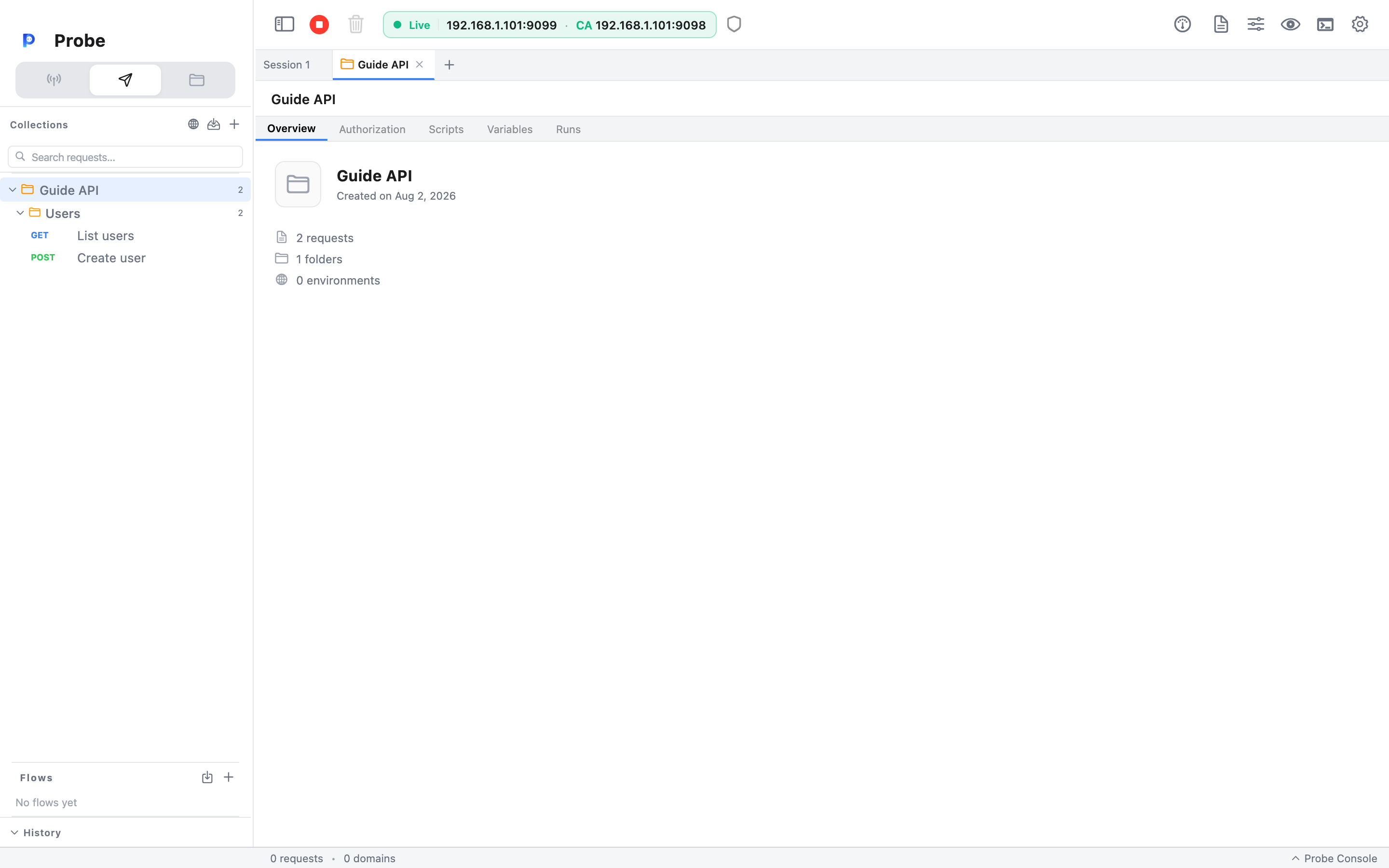
Inside a collection, the tree mixes folders and requests:
▼ My API ▼ auth ▶ POST /login ▶ POST /refresh ▼ users ▶ GET /users ▶ POST /users ▶ DELETE /users/:id ▶ GET /healthFolders nest up to four levels deep. Each folder shows its total request count (including nested subfolders) as a small badge.
Creating, renaming, deleting
Section titled “Creating, renaming, deleting”Right-click any collection, folder, or request to get its context menu:
| Action | Where it shows up | What it does |
| --------------- | ---------------------------------- | ----------------------------------------------------- |
| Rename | Collection / folder / request | Inline rename — type, hit Enter |
| Delete | Collection / folder / request | Asks for confirmation, then removes from disk |
| New Request | Collection / folder | Adds an empty request as a child |
| New Folder | Collection / folder (depth < 4) | Adds a sub-folder |
| Move Up / Down | Folder / request | Reorders the item among its siblings |
| Run | Collection / folder | Opens the runner dialog — see below |
To move an item between folders or collections, right-click and pick Move to…, then choose a target from the destination tree.
Inherited defaults
Section titled “Inherited defaults”A collection (and any folder) can hold defaults that descendants pick up automatically:
- Default headers — a list of header rows that get added to every request in the collection unless the request already sets that header.
- Default auth — an auth config (Bearer, Basic, API Key, OAuth 2.0) that requests inherit when their own auth is set to Inherit from parent.
- Pre-request script and Tests script — JS that runs before/after every request in the collection, in addition to the request's own scripts.
You configure these from the collection's Info view: click the collection name in the sidebar header, or right-click → Collection Info.
How auth resolution works
Section titled “How auth resolution works”When a request is sent, Probe resolves its auth like this:
- If the request has an explicit auth config (anything other than Inherit from parent), that config is applied as-is.
- Otherwise, Probe looks at the request's collection. If the collection has a default auth, that's applied.
- If neither the request nor the collection sets auth, the request goes out without an
Authorizationheader.
The same rule applies to headers: a header set on the request always wins over a default header on the collection. Defaults fill in the gaps; they never override.
Running a folder
Section titled “Running a folder”Right-click a folder or collection and pick Run to fire every request inside it as a sequence. The runner dialog lets you:
- Pick a target — the whole collection or a specific folder.
- Set a delay between requests (helpful for rate-limited APIs).
- Set the number of iterations — repeat the whole sequence N times.
- Choose an environment for the run (overrides the collection's currently active one).
Hit Run and Probe steps through each request, showing live status:
✓ POST /login 200 142 ms 3/3 tests✓ GET /users 200 38 ms 2/2 tests✗ POST /users 400 104 ms 1/2 tests ← assertion failed✓ DELETE /users/42 204 27 ms 1/1 testsThe runner respects the order in the tree (top-to-bottom, depth-first).
Pass/fail follows your test scripts, not just the status code
Section titled “Pass/fail follows your test scripts, not just the status code”Each request's Tests script runs against its response through the same
engine as a single send — pm.test(...) / pm.expect(...) (and the pro.* /
legacy postman.* aliases) all work. A request passes when all of its
assertions pass, exactly like Postman. This matters for negative tests: a
request that asserts pm.response.to.have.status(400) and gets a 400 passes,
even though 400 isn't a 2xx. A request with no test script falls back to
"passes on any 2xx".
Pre-request scripts run first, so pm.environment.set('token', ...) /
pm.collectionVariables.set(...) calls populate variables the next request can
reference with {{token}}. The run also keeps a shared cookie jar: a login
response's Set-Cookie is sent automatically on later requests, so
session-based sequences work without manual wiring.
Reading the results
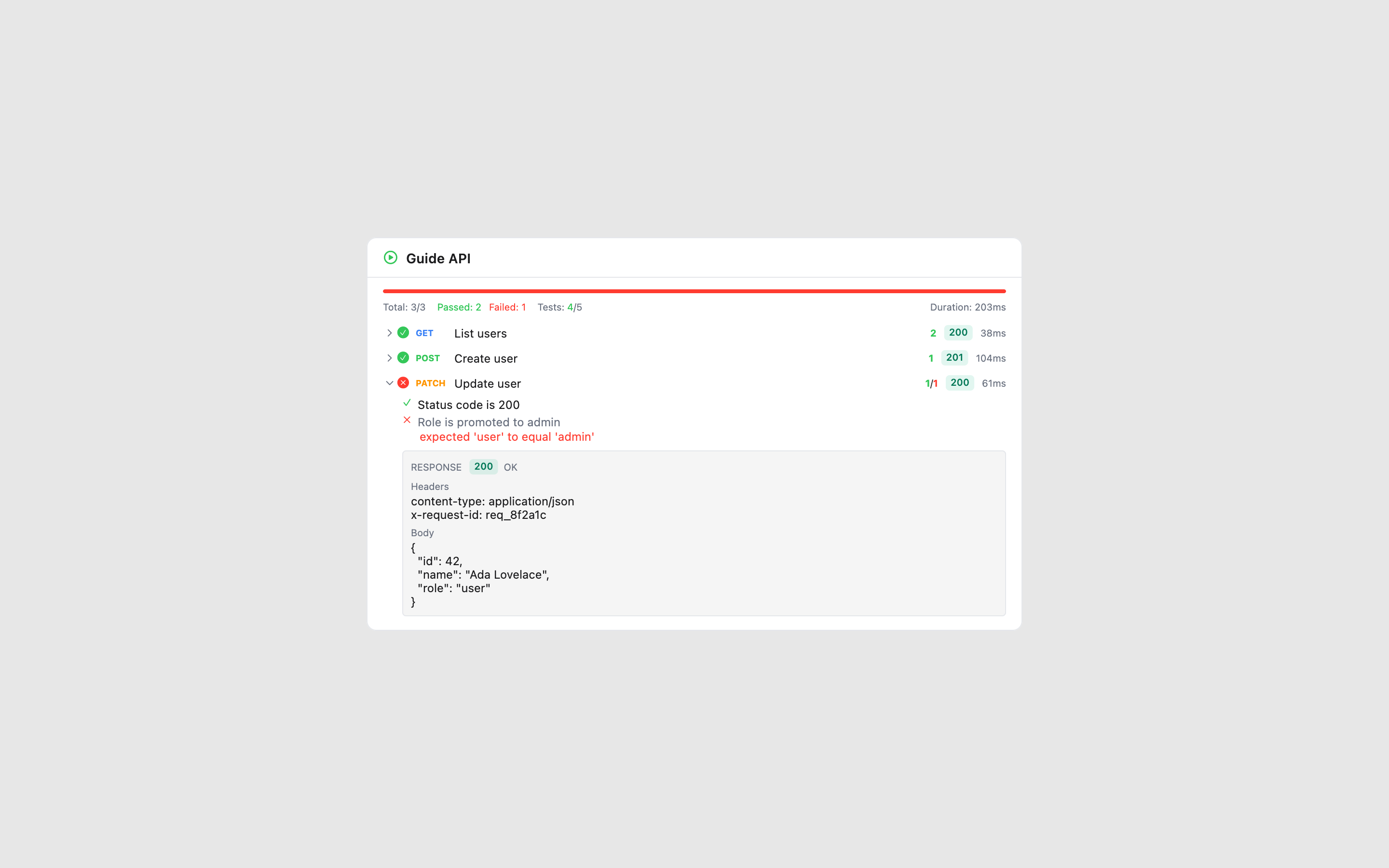
Section titled “Reading the results”After the run finishes, the summary bar shows request pass/fail counts, a Tests: X/N assertion tally, and total elapsed time. Each row is expandable — click it to see:
- every assertion in that request with a ✓/✗ and, for failures, the exact message (e.g. expected 'user' to equal 'admin'), and
- the captured Response — status, headers, and body — so you can see why an assertion failed without re-sending the request.
Persistence and sharing
Section titled “Persistence and sharing”Each collection serializes to one file at ~/.probe/compose/<collection-id>.json. The format is human-readable JSON — environments, variables, scripts, and all. To share a collection with a teammate, hand them the file (or check it into your repo). To export it in a format other tools understand, use Export as Postman from the collection's right-click menu — see Importing for the round-trip details.