
Domain Watch
A typical capture is mostly noise. Open one app and you’ll see requests to analytics endpoints, CDN edges, push-notification keepalives, font hosts, and a dozen other domains that have nothing to do with the bug you’re chasing. Domain Watch filters that out at capture time, so the log shows the API you actually care about.
The rule is simple: watched domains capture every request normally. Unwatched domains show only the first request as a teaser, and subsequent requests to the same domain are dropped before they reach the log.
How the teaser works
Section titled “How the teaser works”When traffic from a new (unwatched) domain hits Probe, the first request lands in the log as a normal row — that’s the teaser. Click it, and the Detail panel is replaced by a Domain Summary panel: host name, request count seen so far, and a Watch Domain button.
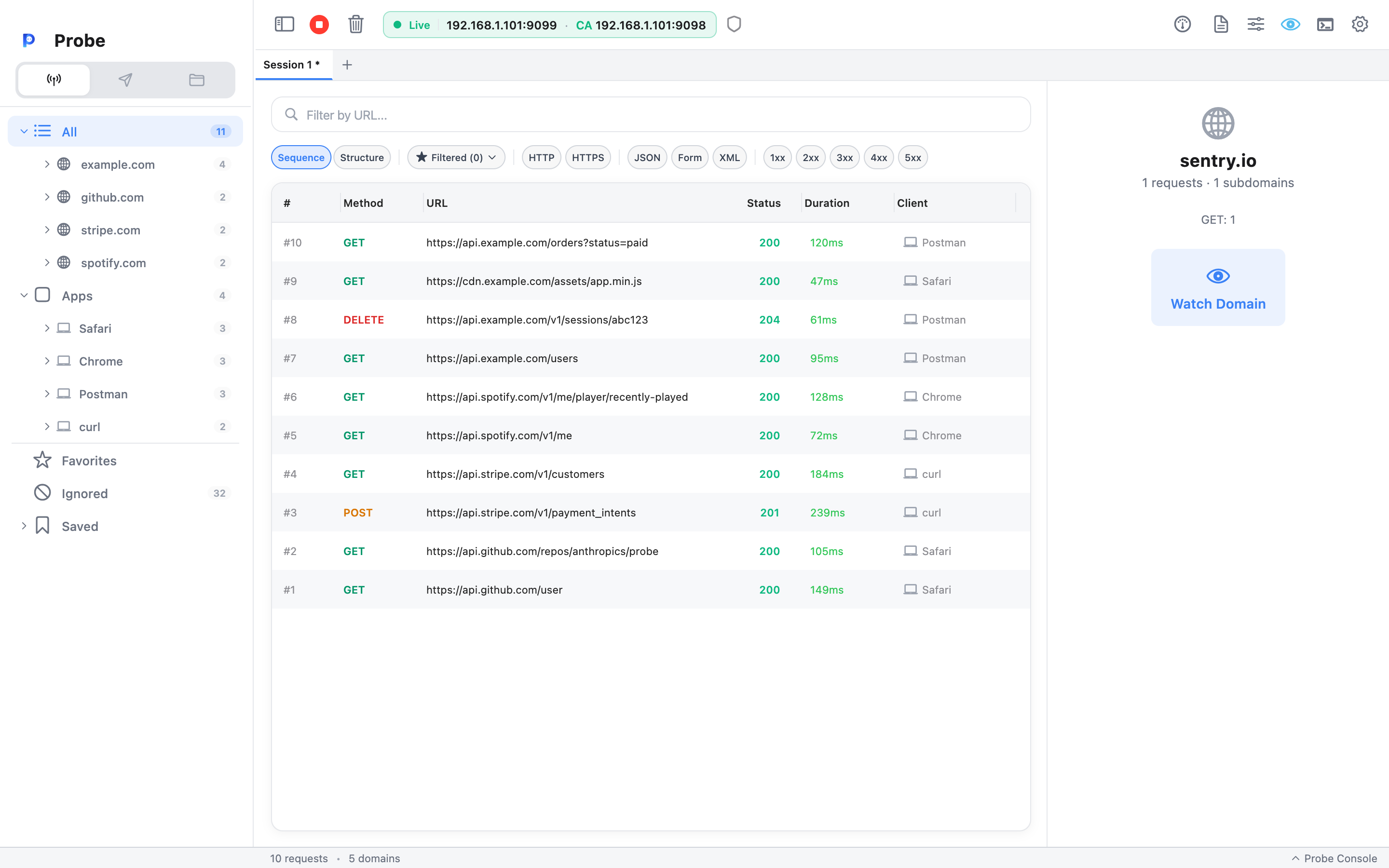
If you don’t watch the domain, every subsequent request to it is silently dropped. They never enter the recording log, so they don’t bloat the captured session, don’t slow down the UI, and don’t show up in Sessions you save later.
If you click Watch Domain, future requests to that host capture in full. Earlier dropped requests aren’t recovered — they were never recorded in the first place.
Watching and unwatching a domain
Section titled “Watching and unwatching a domain”There are three ways to flip the toggle:
- Right-click a domain in the sidebar tree → Watch or Unwatch. The fastest path when the domain is already visible.
- Click the teaser, then Watch Domain in the summary panel.
- View → Watched Domains menu (
Cmd+Shift+Don macOS,Ctrl+Shift+Don Windows) → toggle the row.
The toolbar shows a teal eye icon when at least one domain is watched.
Watched Domains dialog
Section titled “Watched Domains dialog”Open it from View → Watched Domains or with Cmd/Ctrl+Shift+D. The dialog lists every domain Probe has seen this session and lets you:
- Toggle watch on / off per domain.
- Delete a domain from the list (resets it to “never seen” — the next request becomes a fresh teaser).
- Clear all to reset every domain at once.
Watch state persists across app restarts, so domains you watched yesterday stay watched today. The list of dropped/teasered domains is per-session.
When watching helps
Section titled “When watching helps”The pattern that pays off: when you sit down to debug something, you usually know which domain matters. Visit your app, watch the one or two domains you care about, and from then on the log is clean — your endpoints in full detail, everything else condensed to a single teaser row per host.
Concrete examples:
- Debugging the staging API for a mobile app — watch
api.staging.example.com. Telemetry, fonts, image CDN, push servers all collapse to teasers. - Auditing a third-party SDK’s traffic — watch only that SDK’s domain to confirm what it sends home.
- A long QA session — start the day, watch your two backend hosts, capture for hours without filling memory with noise.
Ignored Hosts
Section titled “Ignored Hosts”Domain Watch’s quieter sibling. Right-click any domain in the sidebar and choose Ignore to add it to the Ignored list — Probe drops every future request to that host before it reaches the log, the same way unwatched domains drop after the teaser, but without ever capturing a teaser row. Ignored hosts persist across app restarts. Click Ignored in the sidebar to open the manager, where you can review the list, click + to add a host by name, and remove an entry to start capturing it again.
Use Ignore for domains you actively know you don’t want — your team’s metrics endpoint, OS push keepalives, telemetry that never matters. Use Domain Watch for the inverse case: you don’t know which domains matter yet, so you let teasers in and watch the ones you care about.
How it differs from Filtered Lists
Section titled “How it differs from Filtered Lists”- Domain Watch decides what gets captured. Dropped traffic is gone.
- Filtered Lists decide what gets shown. Filtering is reversible — change the filter, the rows reappear.
Use Domain Watch to keep the log lean from the start. Use Filtered Lists to slice and dice traffic that’s already captured.
Related
Section titled “Related”- Filtered Lists — display-only filters, complementary to Domain Watch
- Sequence vs Structure view — both views honor watch state
- Sessions — saved sessions only contain captured (watched or teaser) traffic
- Detail panel — opens the Domain Summary when you click a teaser