
Settings
Open Settings with Cmd , (macOS) or Ctrl , (Windows), via the gear icon in the toolbar, or from the app menu. The window is split into a left sidebar with two groups — Preferences and System — and a content panel on the right.
Settings persist in SharedPreferences (a per-user OS-level store) so they survive restarts, app updates, and reinstalls.
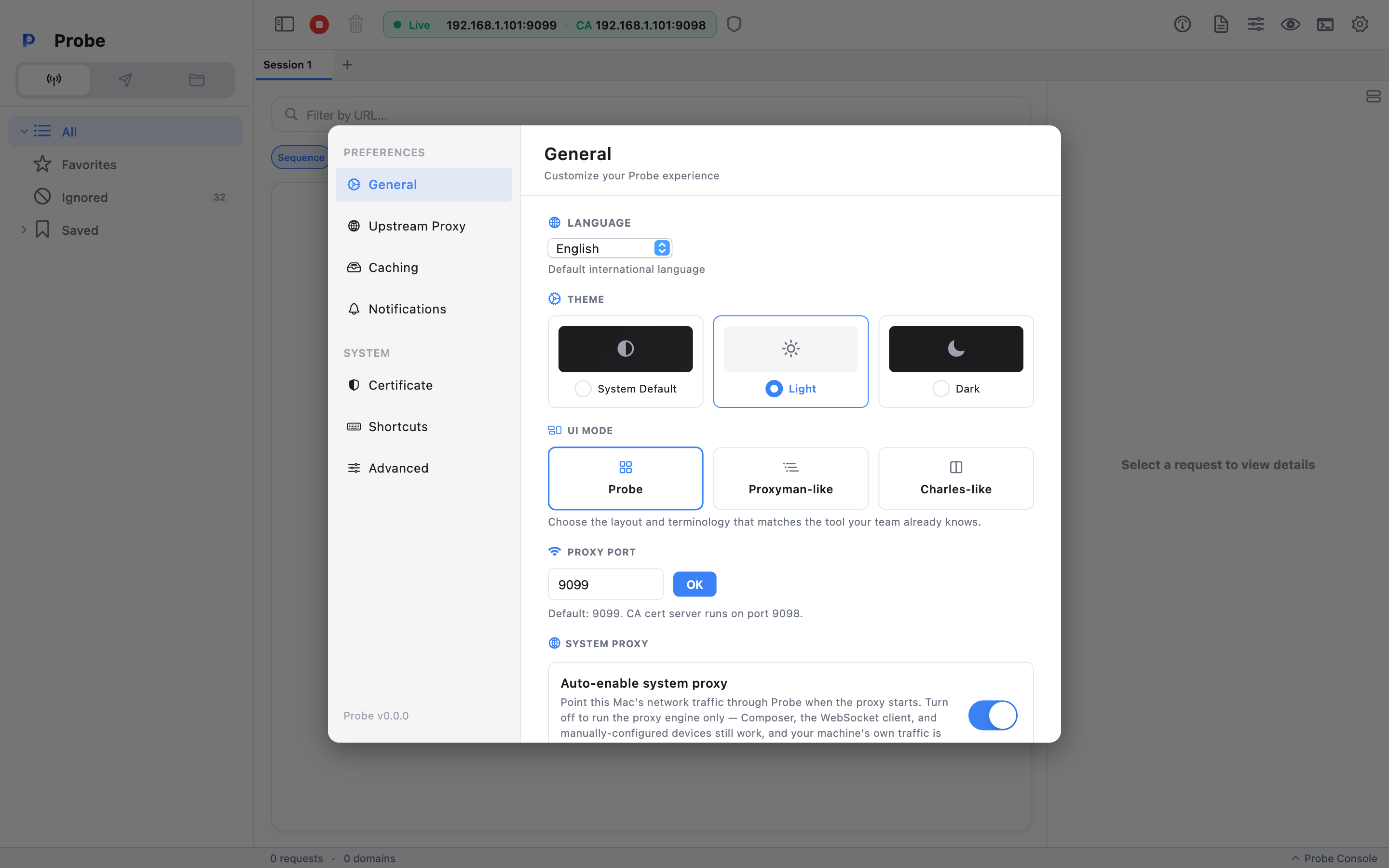
Preferences → General
Section titled “Preferences → General”The General page bundles the small handful of settings most people change.
Language
Section titled “Language”The language used for menus, labels, dialogs. Probe ships with three locales:
- English — default.
- Tiếng Việt (Vietnamese).
- 日本語 (Japanese).
Technical keywords (Traffic, API, Domain, Request, Response, Headers) stay in English in every locale.
Default: English.
| Value | Effect |
|---|---|
| Dark | Dark UI throughout. |
| Light | Light UI throughout. |
| System | Follow the OS appearance. |
Default: Dark.
Proxy port
Section titled “Proxy port”The TCP port the Rust proxy listens on. Probe binds 0.0.0.0:<port> so devices on your LAN can reach it.
- Range: 1024–65535.
- Default: 9099.
Changing the port restarts the proxy. The CA-cert HTTP server stays on its own dedicated port (9098).
Disable response caching
Section titled “Disable response caching”Strips If-None-Match and If-Modified-Since from outgoing requests. With this on, the server can’t return 304 Not Modified and Probe always sees a body to display. Without it, conditional GETs you’d otherwise miss show as 304s with no body.
Default: off.
Quit with unsaved tabs
Section titled “Quit with unsaved tabs”What Probe does when you Cmd Q with one or more dirty session tabs (tabs with traffic that hasn’t been saved as a .pro file).
| Value | Effect |
|---|---|
| Always ask | Show the confirmation alert every time. |
| Save | Auto-save dirty tabs and quit. |
| Discard | Quit without saving. |
The quit-confirmation alert itself has a Don’t ask again checkbox: tick it before clicking Save All or Discard and Probe writes that choice into this setting, so the same action runs silently next quit. This Settings entry is how you undo that override or switch between Save and Discard later — child Settings windows stay in sync with the main window so the choice you make in either place takes effect immediately.
Default: Always ask.
Preferences → Upstream
Section titled “Preferences → Upstream”Configure an upstream HTTP/HTTPS proxy to chain Probe in front of another proxy server (corporate proxy, region-shifting proxy, another mitm tool).
| Field | What it does |
|---|---|
| Enabled | Master switch. When off, Probe connects to origins directly. |
| Host | Upstream proxy hostname or IP. |
| Port | Upstream proxy port. |
| Username / Password | Optional Proxy-Authorization credentials. |
Default: disabled. Reachable directly via Tools → Upstream Proxy… (Cmd Shift U).
Placeholder sections
Section titled “Placeholder sections”The redesigned Settings sidebar lists five more rows that are not wired up yet and currently render a “Coming soon” page:
- Preferences → Caching — will eventually surface the same toggle as General’s “Disable response caching” in a dedicated tab.
- Preferences → Notifications — OS-level notifications for capture events.
- System → Certificate — fingerprint, validity, and quick install actions for Probe’s CA. For now use Certificate → Setup Guide… in the menu bar; covered in detail under Certificate Setup.
- System → Shortcuts — a future read-only reference. Use Keyboard Shortcuts instead — Probe’s shortcuts are not user-customisable today.
- System → Advanced — body-size cap, strip-
Accept-Encoding, data-directory display. Behaviours exist (e.g.Accept-Encodingis stripped for readable bodies), but there’s no UI to tune them yet.
The CA itself lives in ~/.probe/probe_ca/ (macOS) / %USERPROFILE%\.probe\probe_ca\ (Windows). Probe never regenerates it after first launch, so once trusted on a device, it stays trusted.
Storage keys
Section titled “Storage keys”Settings are persisted by the keys defined in StorageKeys in guide_core. A few you may bump into:
| Key | What it stores |
|---|---|
app_locale | Language code (en, vi, ja). |
app_theme_mode | ThemeMode enum index. |
proxy_port | Integer port. |
disable_caching | Boolean. |
quit_with_dirty_action | ask / save / discard. |
blocked_hosts | Ignored host list. |
watched_domains | Domains the user has opted into full-traffic capture for. |
These are reset when you uninstall or by deleting the SharedPreferences file for the app.
Resetting to defaults
Section titled “Resetting to defaults”There’s no “Reset all” button. To start fresh:
- macOS: quit Probe, then
defaults delete com.guide.guideMitmProxy. - Windows: quit Probe, then delete the per-user registry key for the app under
HKEY_CURRENT_USER\Software\com.guide.guideMitmProxy.
The CA cert and saved sessions live separately in ~/.probe/ and are not reset by this.