
Environments & Variables
Variables let you write a request once and run it against any backend. Type {{baseUrl}}/users/{{userId}} in the URL bar, switch the active environment, and the same request hits https://dev.example.com/users/42 or https://prod.example.com/users/42 without you editing a single character.
For a dedicated full-window editor with sidebar, type pills, search, and Postman import/export, see Environment Manager. This page covers the underlying model — scopes, precedence, initial vs current, and secrets.
Probe has two scopes for variables:
- Globals — shared across every collection, every workspace. Good for things like your local machine's IP, an OAuth client ID you reuse everywhere, or a long-lived test API key.
- Environments — scoped to a single collection. Each environment is a named bag of variables (e.g.
Dev,Staging,Prod), and a collection has at most one active environment at a time.
That's it — there's no per-folder or per-request variable scope. If you need a variable that only matters to one request, put it inline; if you'll reuse it, lift it to an environment.
Precedence
Section titled “Precedence”When Probe resolves {{key}}, it looks in two places, in order:
- Active environment of the request's collection.
- Globals.
The first match wins. So if both your Prod environment and your globals define apiKey, the environment value is used while Prod is active. Switch to a different environment that doesn't define apiKey, and the global value comes through.
If neither place defines key, the literal {{key}} stays in the resolved string. That's intentional — you'll see it in the URL preview and in the captured request, so a missing variable is loud, not silent.
Where variables work
Section titled “Where variables work”Anywhere Probe sees {{name}} in a string field, it interpolates. That covers:
- The URL — including the path, query string, and host.
- Header names and values.
- The request body — including JSON content, form fields, and GraphQL variables.
- Auth fields — Bearer tokens, Basic Auth username/password, API key name and value.
- Pre-request and test scripts (via the
pro.environment.get()andpro.globals.get()helpers).
Hover any token in the URL bar or a key/value field, and Probe shows the resolved value plus the source (e.g. "{{baseUrl}} → https://api.example.com (env: Prod)"). That preview is the fastest way to spot a typo or a missing definition.
Initial value vs current value
Section titled “Initial value vs current value”Each variable in an environment has two values:
- Initial value — what you committed. Persisted to disk; this is the value that sticks around between launches and gets shared if you export the collection.
- Current value — what's set during the active session. Pre-request scripts that call
pro.environment.set('token', '…')write here. Inline edits in the environment editor write here. The current value takes precedence over the initial when resolving — so a script-set token overrides the saved one for as long as the app is open, without polluting the persisted file.
The environment editor shows both as columns side by side. To revert a current value back to the initial, clear it. To promote a current value to initial — for example, after capturing a token you want to keep — click the Persist action on the row.
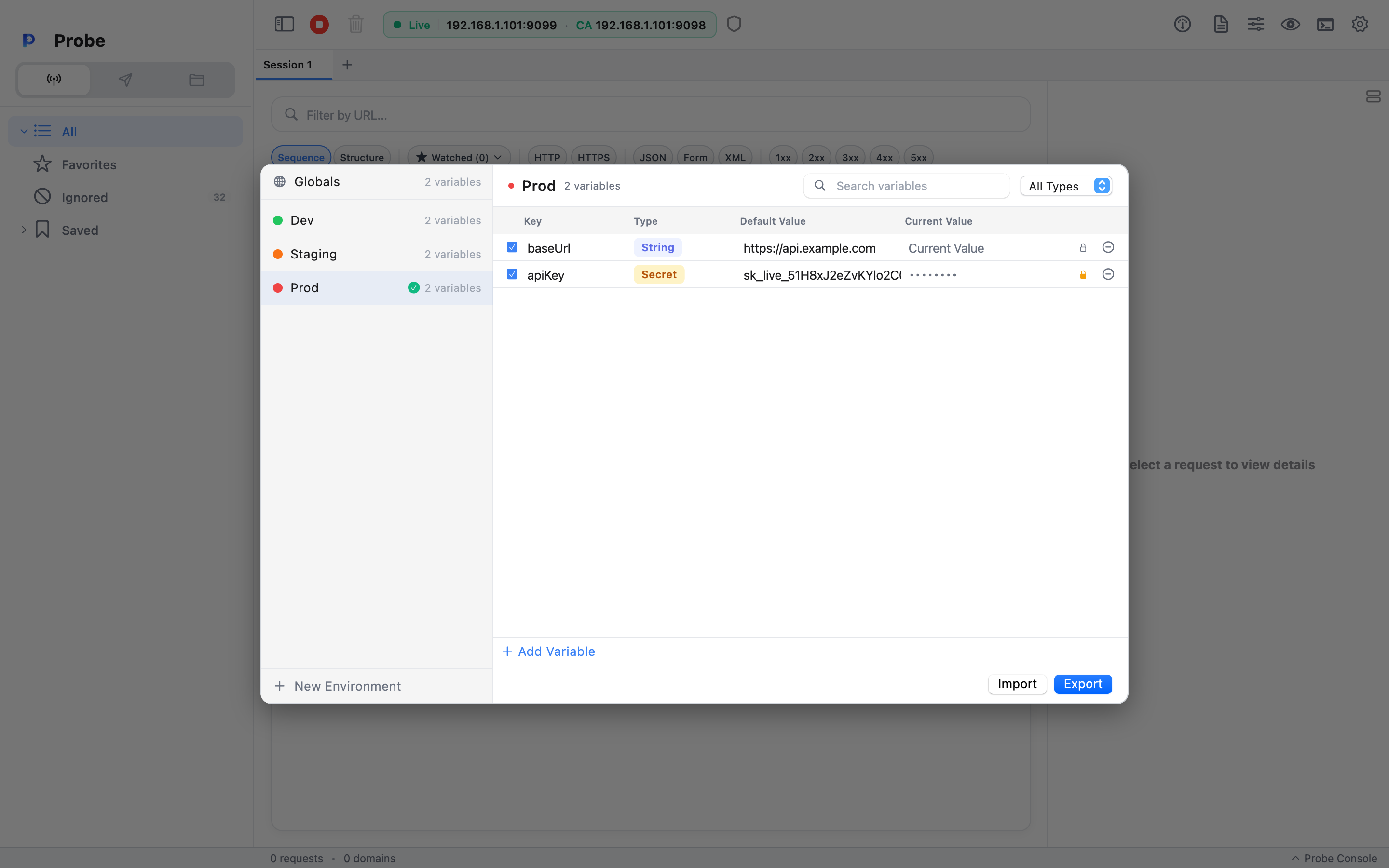
This separation is borrowed from the same Postman concept and serves the same purpose: keep your committed state clean, let runtime mutations stay runtime.
Secrets
Section titled “Secrets”A variable can be marked as secret. The behaviour:
- The value is masked in the variable editor (shown as dots, with a peek toggle).
- The value is masked in console output and test results when the variable is referenced.
- The value is not included when you export a collection as a Postman v2.1 file — secret rows ship with an empty value, so you can share a collection without leaking credentials.
Use Secret for tokens, passwords, signing keys — anything you wouldn't paste into a public Slack channel.
Switching environments
Section titled “Switching environments”The environment selector lives at the top right of the Composer view, next to the request tabs. It's a dropdown with one entry per environment in the active collection, plus a No environment option.
Pick one, and every open request immediately re-resolves its variables. The URL bar preview updates live. There's no reload — Probe just re-runs the substitution next time it needs to.
You can also right-click an environment in the collection sidebar (under the collection's Environments node) to:
- Set as Active — same as the dropdown.
- Duplicate — copy the whole environment, including current values and secret flags. Handy when you want a
Dev (alt)that diverges fromDevfor one experiment. - Rename / Delete — straightforward.
- Color tag — pick a small dot color shown next to the environment name, so
Prodreads red andDevreads green at a glance.
A worked example
Section titled “A worked example”Say you have one request:
POST {{baseUrl}}/usersAuthorization: Bearer {{token}}Content-Type: application/json
{ "name": "{{newUserName}}" }
With these definitions:
| Scope | Variable | Initial | Current |
| ---------------------- | ------------- | ---------------- | ----------------- |
| Globals | newUserName | Test User | (empty) |
| Env Dev (active) | baseUrl | http://localhost:3000 | (empty) |
| Env Dev (active) | token | dev-static-token | (empty) |
| Env Prod | baseUrl | https://api.example.com | (empty) |
| Env Prod | token | (empty) | (empty, secret) |
While Dev is active, the request resolves to:
POST http://localhost:3000/usersAuthorization: Bearer dev-static-token
{ "name": "Test User" }
Switch to Prod, and baseUrl flips. token is empty in Prod, so a pre-request script (or a manual edit) needs to set its current value before the request is sendable.